

Ship Faster: A Practical Guide to AI-Assisted App Development

Ship Faster: A Practical Guide to AI-Assisted App Development
Concrete ways AI speeds up building and shipping apps, from prototyping to launch.
The software development landscape is in constant flux, with innovation being the only constant. In recent years, one of the most transformative forces has been the rise of Artificial Intelligence (AI). Far from being a futuristic concept, AI is now a tangible tool empowering developers to build, test, and deploy applications faster and more efficiently than ever before. This guide explores practical, actionable ways AI is revolutionizing app development, from the initial spark of an idea to the triumphant launch of a finished product. Whether you're a seasoned developer looking to boost your productivity or an entrepreneur with a groundbreaking app concept, understanding and leveraging AI can be your competitive edge. For those eager to see these advancements in action and experience a streamlined path to app creation, tools like GetAppQuick offer a compelling glimpse into the future of development today.
The AI Revolution in App Development: Beyond the Hype
The conversation around AI in tech often conjures images of sentient robots or complex algorithms performing tasks beyond human comprehension. While those scenarios might hold some truth in specific research contexts, the practical application of AI in app development is far more grounded and immediately accessible. AI's current impact stems from its ability to automate repetitive tasks, generate creative content, analyze vast datasets, and even predict potential issues before they arise. This translates directly into faster development cycles, reduced costs, and ultimately, the ability to ship applications to market with unprecedented speed.
Prototyping and Ideation: From Concept to Visual
The journey of any app begins with an idea, but translating that idea into a tangible prototype can be a significant bottleneck. AI is dramatically accelerating this initial phase. AI-powered design tools can now generate user interface (UI) mockups from simple text descriptions, allowing product managers and designers to rapidly iterate on visual concepts. This not only saves time but also provides a clear, concrete representation of the app's intended look and feel early in the process.
Consider the process of creating a simple e-commerce app screen. Traditionally, this would involve wireframing, designing, and potentially building a basic interactive prototype. With AI, a prompt like "Create a mobile app screen for an online bookstore featuring a search bar at the top, a carousel of featured books below, and a bottom navigation bar with icons for home, categories, and profile" can yield a surprisingly accurate visual representation.
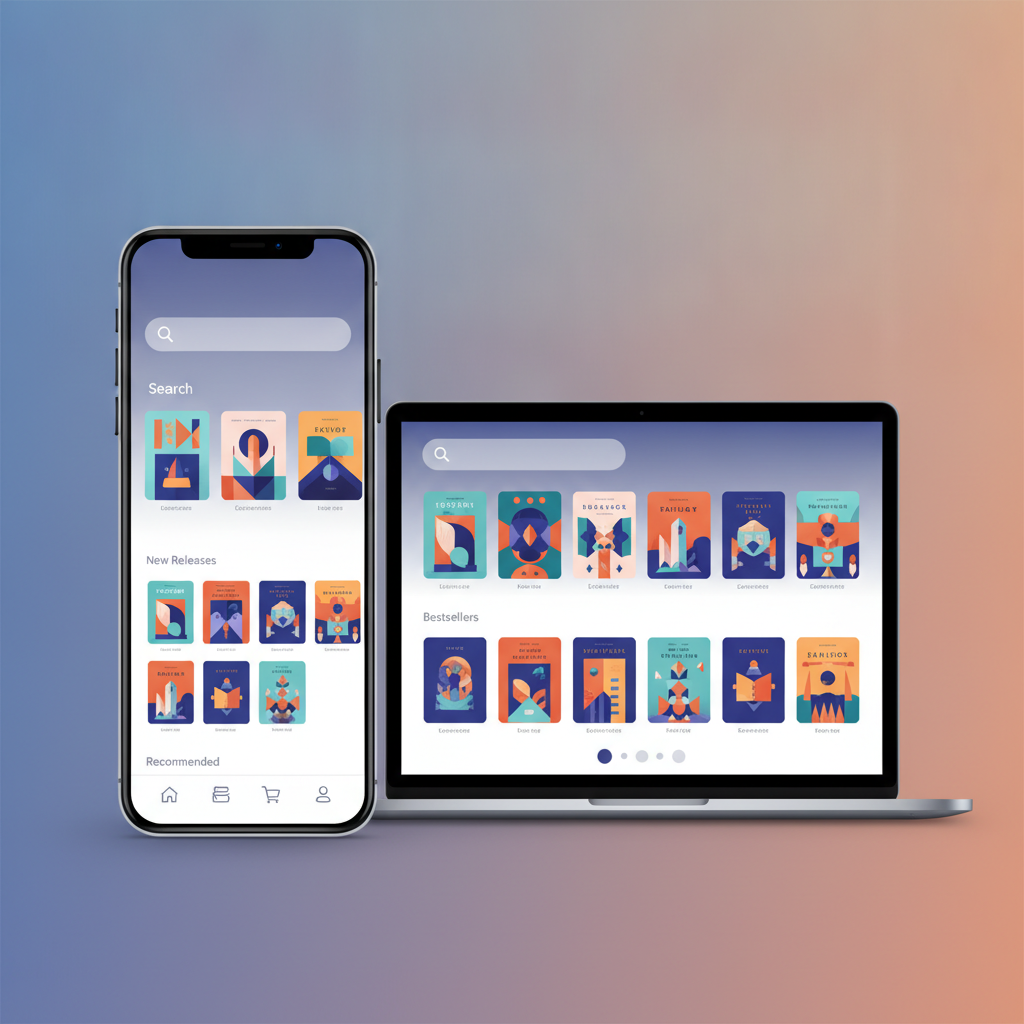
These AI-generated prototypes serve multiple purposes: they facilitate clearer communication among stakeholders, enable quicker user feedback cycles, and provide a solid foundation for the development team. This rapid visualization helps to de-risk the project by ensuring everyone is aligned on the core user experience from the outset.
Code Generation and Autocompletion: Writing Smarter, Not Harder
Perhaps the most direct impact of AI on development workflows is in code generation and intelligent autocompletion. Large Language Models (LLMs) trained on massive code repositories can now assist developers in writing code more efficiently. This goes beyond simple syntax highlighting or basic suggestions. Modern AI coding assistants can:
- Generate boilerplate code: Tasks like setting up new components, writing API call structures, or creating database schemas can be significantly sped up.
- Suggest complex logic: Based on the context of the code being written, AI can propose entire functions or algorithms.
- Translate code: Converting code snippets from one language to another is becoming increasingly feasible.
- Identify and fix bugs: AI can analyze code for potential errors, suggest corrections, and even automate the refactoring process.
For example, in TypeScript, a developer might need to fetch data from an API. Instead of manually writing the fetch call, setting up the async/await structure, and handling potential errors, an AI assistant can often generate the entire block with a simple prompt or by observing the developer's intent.
// Prompt: "Write a TypeScript function to fetch user data from /api/users/{id}"

async function fetchUserData(userId: string): Promise<UserData | null> {
  try {
    const response = await fetch(`/api/users/${userId}`);
    if (!response.ok) {
      // Handle HTTP errors
      console.error(`HTTP error! status: ${response.status}`);
      return null;
    }
    const data: UserData = await response.json();
    return data;
  } catch (error) {
    // Handle network errors or JSON parsing errors
    console.error("Failed to fetch user data:", error);
    return null;
  }
}

interface UserData {
  id: string;
  name: string;
  email: string;
  // ... other user properties
}
Similarly, in Dart for Flutter development, AI can assist with UI widget generation. A developer might describe the desired UI element, and the AI can generate the corresponding Flutter code.
// Prompt: "Create a Flutter StatelessWidget for a custom button with a blue background, white text, and rounded corners"

import 'package:flutter/material.dart';

class CustomBlueButton extends StatelessWidget {
  final String text;
  final VoidCallback onPressed;

  const CustomBlueButton({
    Key? key,
    required this.text,
    required this.onPressed,
  }) : super(key: key);

  @override
  Widget build(BuildContext context) {
    return ElevatedButton(
      onPressed: onPressed,
      style: ElevatedButton.styleFrom(
        backgroundColor: Colors.blue, // Blue background
        shape: RoundedRectangleBorder(
          borderRadius: BorderRadius.circular(12.0), // Rounded corners
        ),
      ),
      child: Text(
        text,
        style: const TextStyle(color: Colors.white), // White text
      ),
    );
  }
}
These examples illustrate how AI acts as an intelligent pair programmer, augmenting developer capabilities and significantly reducing the time spent on repetitive or formulaic coding tasks. This allows developers to focus on the more complex, creative, and problem-solving aspects of software engineering.
Automated Testing and Quality Assurance: Catching Bugs Before They Bite
Software quality is paramount, and thorough testing is a non-negotiable part of the development lifecycle. AI is making waves in QA by automating test case generation, execution, and even intelligent bug detection. AI algorithms can analyze code changes, identify areas most likely to contain defects, and generate relevant test scenarios.
This means that instead of manually writing hundreds of test cases for various user flows and edge cases, AI can:
- Generate unit and integration tests: Based on code structure and functionality, AI can propose test suites.
- Perform visual regression testing: AI can detect unintended UI changes that might be missed by human testers.
- Analyze test results: AI can help pinpoint the root cause of test failures more efficiently.
- Predict potential bugs: By learning from historical data, AI can flag code sections that have a higher probability of containing bugs.
A prime example of AI's impact in this area is in automated UI testing frameworks. Tools are emerging that use AI to "learn" the application's UI and interact with it autonomously, identifying breaking changes or functional issues. This significantly reduces the manual effort required for regression testing, a task that often consumes a substantial portion of a development team's time.

The ability to catch and fix bugs earlier in the development cycle is crucial for maintaining velocity. AI-driven QA processes ensure that the app is not only built quickly but also built with a high degree of reliability and stability.
Deployment and Operations: Streamlining the Path to Production
The benefits of AI extend beyond the development environment and into the realm of deployment and ongoing operations (DevOps). AI can optimize cloud infrastructure, automate deployment pipelines, and provide intelligent monitoring and anomaly detection for live applications.
- Intelligent CI/CD: AI can analyze build times, test durations, and deployment success rates to identify bottlenecks and suggest optimizations in Continuous Integration and Continuous Deployment (CI/CD) pipelines.
- Predictive scaling: AI can forecast traffic patterns and automatically adjust server resources, ensuring optimal performance and cost-efficiency.
- Anomaly detection: In production, AI-powered monitoring tools can sift through logs and metrics to identify unusual patterns that might indicate a performance issue or a security threat, often before human operators would notice.
Consider a scenario where an application experiences a sudden surge in user activity. Without AI, manual intervention or pre-configured, often inefficient, scaling rules might be in place. An AI system, however, can analyze the incoming traffic in real-time, compare it to historical data, and proactively scale resources up or down to match demand precisely, ensuring a seamless user experience.
Real-World Applications and Case Studies
The theoretical benefits of AI in app development are compelling, but its real-world impact is even more so. Many companies are already leveraging AI to accelerate their development cycles.
For instance, a startup aiming to launch a new social networking app needs to iterate rapidly to gain market traction. By integrating AI tools for UI generation, code completion, and automated testing, they can move from initial concept to a Minimum Viable Product (MVP) in a fraction of the time it would have taken just a few years ago. This speed allows them to gather user feedback and pivot based on market response much faster.
Many platforms are emerging that aim to democratize app development. Tools like GetAppQuick are designed to empower individuals and businesses to bring their app ideas to life quickly, using AI to abstract away much of the complex coding and infrastructure management. This allows founders to focus on product strategy and user acquisition, rather than getting bogged down in technical implementation details. Their AI-powered builder can take a user's requirements and transform them into a functional application, significantly reducing the time and resources typically required for app development.
Getting Started with AI in Your Workflow
Integrating AI into your app development workflow doesn't have to be an all-or-nothing proposition. You can start small and gradually adopt AI tools as you become more comfortable.
- Experiment with AI Coding Assistants: Tools like GitHub Copilot, Tabnine, or Amazon CodeWhisperer can be integrated directly into your IDE. Start by using them for simple code generation or autocompletion and observe how they can speed up your daily tasks.
- Explore AI Design Tools: If you're involved in the design phase, try using AI-powered tools to generate mood boards, initial UI mockups, or even user flow diagrams.
- Leverage AI for Testing: Look into AI-driven testing frameworks that can automate test case generation or provide more intelligent insights into your test results.
- Consider Low-Code/No-Code AI Platforms: For simpler applications or MVPs, platforms like GetAppQuick offer an end-to-end AI-assisted development experience that can turn an idea into a working app with minimal coding expertise.
The key is to identify the areas in your current development process where AI can offer the most significant gains in speed and efficiency.
Challenges and Considerations
While the benefits of AI in app development are immense, it's important to acknowledge the challenges and consider potential pitfalls:
- Accuracy and Reliability: AI-generated code or designs are not always perfect. They require careful review and testing by human developers to ensure accuracy, security, and adherence to best practices.
- Ethical Considerations: Issues around data privacy, algorithmic bias, and intellectual property for AI-generated content need to be carefully navigated.
- Over-reliance: Developers should view AI as a tool to augment their skills, not replace them entirely. Critical thinking, problem-solving, and architectural design remain human-centric skills.
- Integration Complexity: Integrating various AI tools into existing development pipelines can sometimes present its own set of challenges.
The Future of AI-Assisted Development
The trajectory of AI in app development is undeniably upward. We can expect to see even more sophisticated AI tools that can handle increasingly complex tasks, from automated debugging of intricate systems to AI-driven project management that optimizes resource allocation and timelines. The line between human and AI collaboration in software creation will continue to blur, leading to faster innovation cycles and more robust applications.
AI is not just about building apps faster; it's about building better apps faster. It empowers development teams to focus on innovation, user experience, and solving complex problems, rather than getting bogged down in repetitive tasks.
Key Takeaways
- AI is a practical tool for accelerating app development across all stages, from ideation to deployment.
- AI assists in rapid prototyping by generating UI mockups from text descriptions.
- AI coding assistants significantly speed up development by generating boilerplate code, suggesting logic, and improving autocompletion.
- AI enhances Quality Assurance through automated test case generation, execution, and bug detection.
- AI optimizes deployment and operations by streamlining CI/CD pipelines and enabling predictive resource management.
- Platforms like GetAppQuick offer an integrated AI-powered approach to app building.
- While powerful, AI tools require human oversight for accuracy, reliability, and ethical considerations.
The future of software development is one of human-AI collaboration, where intelligent tools empower developers to achieve unprecedented levels of speed and creativity. Embracing these technologies is no longer optional; it's essential for staying competitive in today's fast-paced digital world.
Ready to ship your idea? Build it in minutes with GetAppQuick.


